HEX, RGB, HSL and OKLCH colour codes explained
HEX, RGB, HSL and OKLCH colour codes are four ways to write the same colour. HEX and RGB describe how much red, green and blue light a screen emits, while HSL and OKLCH describe a colour the way you think about it: which hue, how vivid, how light. Pick the one that fits the job and convert freely with the colour picker: paste any of them into its code field and the others update.
Below, I follow one real colour, a strong blue, through all four notations with the arithmetic shown, so you can check any converter, including mine. Then I cover alpha, and why I now build every palette in OKLCH.
The four colour models at a glance
| Model | Our blue | What the numbers mean | Best for |
|---|---|---|---|
| HEX | #1d4ed8 | Red, green, blue as two hex digits each (00–ff) | Sharing, tokens, design tools |
| RGB | rgb(29 78 216) | Red, green, blue as 0–255 | Maths, canvas, alpha blending |
| HSL | hsl(224.3 76.3% 48%) | Hue angle, saturation, lightness | Quick hand tweaks |
| OKLCH | oklch(48.82% 0.2172 264.38) | Perceived lightness, chroma, hue angle | Palettes, shades, accessible scales |
All four sit in sRGB unless you ask for more. HEX and RGB are the same numbers in two spellings; HSL is a re-labelling of RGB; OKLCH is derived from a model of human vision and can also reach the wider Display P3 gamut.
HEX: RGB in base 16
A hex code is #RRGGBB. Each pair is one channel written in base 16, where the digits run 0–9 then a–f (a = 10 … f = 15). The value of a pair is first digit × 16 + second digit.
1d= 1 × 16 + 13 = 294e= 4 × 16 + 14 = 78d8= 13 × 16 + 8 = 216
So #1d4ed8 is rgb(29 78 216). Going back, 216 ÷ 16 = 13 remainder 8, so 216 is d8. The shorthand #rgb doubles each digit, so #f80 means #ff8800. It only works when both digits of every pair match; #1d4ed8 has no short form. An 8-digit code adds alpha at the end: #RRGGBBAA. Android’s ARGB puts it first, and mixing the two up is the most common alpha bug I see.
RGB: three channels of light
RGB gives each channel as 0–255 (or a percentage). Modern CSS writes it space-separated, rgb(29 78 216), with alpha after a slash: rgb(29 78 216 / 50%). The old comma form rgb(29, 78, 216) still works everywhere. Use RGB when you compute something: blending, canvas pixels, image processing. It is a poor way to think about a colour, because “make it a bit lighter” means changing all three numbers by different amounts.
HSL: hue, saturation, lightness
HSL rearranges RGB into something you can steer. Hue is an angle on the colour wheel (0° red, 120° green, 240° blue), saturation is how far from grey, lightness runs from black to white.
max = 0.8471, min = 0.1137, d = max − min = 0.7333
L = (max + min) / 2 = 0.4804 → 48%
S = d / (1 − |2L − 1|) = 0.7333 / 0.9608 = 0.7633 → 76.3%
max is blue, so H = 60 × (4 + (R − G) / d) = 60 × (4 − 0.2620) = 224.3°
Result: hsl(224.3 76.3% 48%). The picker prints one decimal for a reason: round-trips through whole numbers lose a unit. Converting the rounded hsl(224 76% 48%) back gives #1d4fd7, one step off in green and blue, while the one-decimal version returns #1d4ed8. I still keep the original HEX as the source of truth and treat HSL as a working view.
OKLCH: lightness you can trust
OKLCH is the polar form of Oklab, a colour space designed so that equal numeric steps look like equal visual steps. L is perceived lightness (0–1), C is chroma (colourfulness, about 0 to 0.4) and H is the hue angle in degrees. The conversion goes through four steps, using the matrices from Oklab’s author, Björn Ottosson:
- Linearise sRGB. Undo the gamma curve: 29, 78, 216 become 0.0123, 0.0762, 0.6867.
- Mix to cone responses (LMS). The matrix gives 0.0813, 0.1282, 0.4551.
- Take cube roots. 0.4331, 0.5042, 0.7692.
- Mix again to Lab. L = 0.4882, a = −0.0213, b = −0.2161. Then chroma C = √(a² + b²) = 0.2172 and hue H = atan2(b, a) = 264.38°.
Result: oklch(48.82% 0.2172 264.38), which CSS also accepts as oklch(0.4882 0.2172 264.38). The picker prints the percentage form. The syntax and the rules for out-of-gamut values are on MDN’s oklch() page. Browser support is complete in current Chrome, Edge, Firefox and Safari, so you can write it in production CSS and give old browsers a HEX fallback if you must.
Why OKLCH makes even shades
In HSL, “50% lightness” is a formula on the RGB cube, not a measure of brightness. Pure yellow and pure blue are both L = 50%, and yet one is almost white and the other is a fairly dark blue.
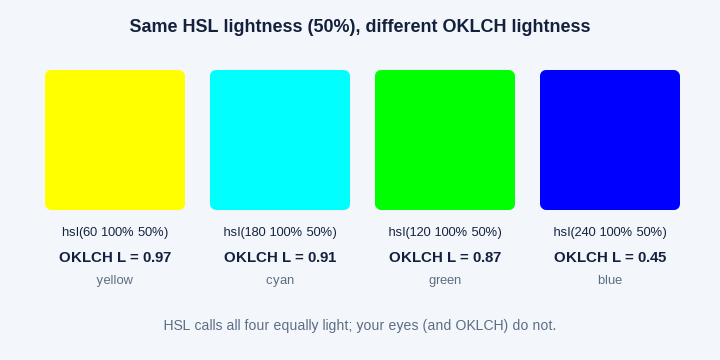
This matters the moment you build a scale. Compare five-step ramps of the same blue:
| Ramp | Step values | Real OKLCH L |
|---|---|---|
| HSL, hue 224, S 76%, L 90 / 70 / 50 / 30 | #d2dcf9, #7897ed, #1f52e0, #123187 | 0.896, 0.690, 0.503, 0.353 — gaps of 0.21, 0.19, 0.15 |
| OKLCH, hue 264, C 0.10, L 0.75 / 0.65 / 0.55 / 0.45 / 0.35 | #8eadee, #708ecd, #5370ac, #38538d, #1f376e | Exactly 0.10 apart by construction |
Equal L steps also make contrast predictable: two colours roughly 0.4 apart in L are a sensible starting point for text that has to pass WCAG AA (white against mid-grey #767676 is about 0.43 apart, and just passes). Always measure, as shown in the contrast guide. Two cautions: very light and very dark steps cannot hold much chroma, so a high C at L 0.95 gets clipped to the sRGB gamut (the ramp above stays at C 0.10 so every step is in range); and the hue angle is not the same as an HSL hue, so do not reuse 224 as 224.
With relative colour syntax you can make a whole scale from one variable: oklch(from var(--brand) calc(l - 0.1) c h) gives a darker sibling at the same chroma and hue, with no extra tokens.
Alpha: the same colour, see-through
Every model takes an alpha channel. A half-transparent version of our blue can be written:
#1d4ed880(hex alpha 80 = 128, and 128 ÷ 255 = 50.2%)rgb(29 78 216 / 50%)hsl(224.3 76.3% 48% / 0.5)oklch(48.82% 0.2172 264.38 / 50%)
On a white page, that 50% blue looks like rgb(142 166 236), from (29 × 0.5 + 255 × 0.5), (78 × 0.5 + 255 × 0.5) and (216 × 0.5 + 255 × 0.5). The look changes with the background, so never judge a transparent colour’s contrast without flattening it first.
Which one to use, and where
| Situation | Use | Why |
|---|---|---|
| Handing a colour to a developer or pasting into a design tool | HEX | Short, universal, unambiguous |
| Design tokens in CSS | HEX, with OKLCH for generated scales | HEX for fixed brand values, OKLCH when steps are computed |
| Hover, disabled and border states | OKLCH, change L only | Same hue and chroma, predictable lightness |
| Quick manual tweak in dev tools | HSL | Easy to nudge, but check the result |
| Canvas, shaders, blending | RGB | That is what the maths uses |
| Anything printed | Get a proof | None of these is CMYK, and a formula is not a press profile |
My own workflow: pick the brand colour from a logo or screenshot as HEX (see how to pick a colour from an image), convert it to OKLCH once, and build everything else by changing L and C. The colour picker shows all four notations side by side, plus HSV (the model behind the colour squares in Photoshop and Figma) and an approximate CMYK, and a switch turns the output between modern space-separated CSS and the legacy comma form. The numbers in this guide are one click away.
Things people ask
What is the difference between HEX and RGB?
They hold the same three numbers. HEX writes red, green and blue in base 16 (#1d4ed8) and RGB writes them as 0-255 (rgb(29 78 216)). Converting is arithmetic only, so nothing is lost.
How do I convert HEX to RGB by hand?
Split the code into pairs and convert each from base 16: first digit times 16 plus the second digit. For #1d4ed8 that gives 29, 78 and 216.
Should I use HSL or OKLCH in CSS?
Use HSL for quick tweaks and OKLCH for palettes. OKLCH lightness matches what you see, so steps of the same L look equally light for every hue, while HSL lightness does not.
Where does the alpha go in an 8-digit hex code?
At the end: #RRGGBBAA. For example #1d4ed880 is the same blue at about 50% opacity. Android's ARGB order puts alpha first, so check the platform.
Do all browsers support oklch()?
Current Chrome, Edge, Firefox and Safari all support it. If you must support older browsers, put a HEX declaration before the oklch() one as a fallback.

